 |
|
In PDBsum PROSITE pattern matches to a protein's
sequence are shown on the PDB entry's Protein page. Where possible, false positive
matches are excluded using a number of filters and comparisons
(eg by checking the PDB code versus the PROSITE and SWISS-PROT
databases, or by looking at key names and words in the PDB entry's
header records).
|
 PROSITE patterns
|
Number of alternative residues defining this position |
Colour |
| 1 | red |
| 2 | redorange |
| 3 | orange |
| 4 | yellow |
| 5 | green |
| 6 | greenblue |
| 7 | purple |
| 8 | skyblue |
| 9 or more | blue |
| Any residue | black (white in structure) |
So, for example, the sequence Phe99->Gly108 in PDB file 1a0c, which matches the PS00173 pattern, is coloured as follows:-
FHDRDIAPEG
The redder the colour the more critical and strictly conserved the residue.
Viewing the patterns in 3D
The 3D structure corresponding to a given PROSITE pattern can be viewed in RasMol. If there are several patterns for the given sequence, each will have a check-box associated with it. Click on the check-boxes to select the pattern(s) you want to view, and then click on the "DISPLAY" button.
If there is only a single pattern for the sequence, there will
be no "DISPLAY" button. To view the pattern, click on the  icon instead.
The example pattern used above appears in RasMol as shown below.
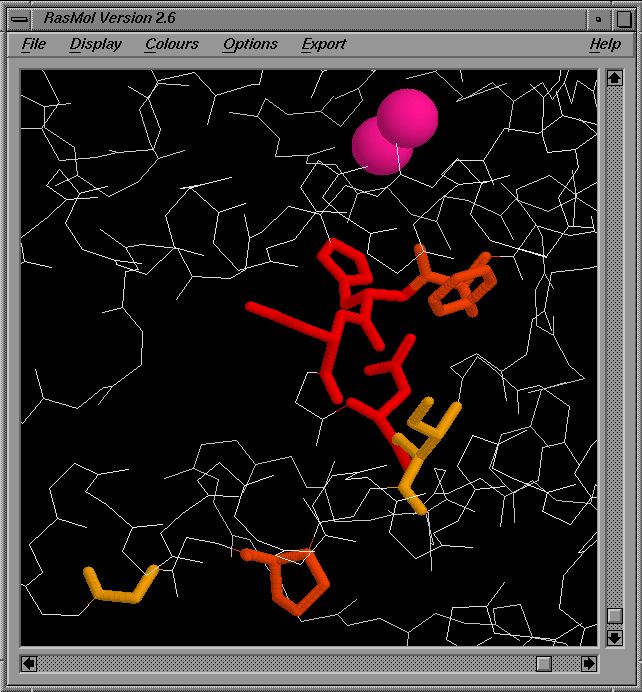
Here, the sidechains of the residues matching the PROSITE pattern are shown as thick sticks, coloured according to the residue conservation. All other residues in the protein are shown using a white wireframe representation of mainchain atoms only. Any ligands or metal ions associated with the chain are shown in spacefill mode.
Note. To view the PROSITE patterns in RasMol requires that your browser has been correctly configured for viewing RasMol scripts.
Click here for information on configuring your
browser for the option.
 |