
File List Guide
Summary
Each study component and annotation section must have one file list. These are used to describe the files you wish to include in your submission associated with the relevant component, including image files, annotations, and other supporting files e.g., analysis results such as a spreadsheet containing cell areas.
- File lists are tabular data, either in tsv or Excel (.xlsx) format.
- The first column of the header has to be the word “Files”.
- If submitting annotations, the annotations file list should also include a “source_image” column.
- It has to have one file per line.
- Do not leave blank lines.
- Filenames are case-sensitive.
- File path separator must be forward slash “/”.
- Some special characters are not allowed (see below).
- If submitting zarr or ome-zarr files, check this page.
A File List Generator Tool
You can now generate a file list of everything within a given directory under your user space with one click. We have developed a file list generator that is displayed next to every directory in your user space, under the File Upload tab (marked with red in the figure below). Please note that this tool only provides the paths and names of the files in a given directory (recursively, i.e. lists all the files in all sub-directories within that directory). You’d still need to add any relevant metadata yourself.

Detailed Help
A File List is used to describe the files you wish to include in your submission associated with the relevant component, including image files, annotations, and other supporting files e.g., analysis results such as a spreadsheet containing cell areas.
Each study component and annotation section must have one file list.

File lists are tabular data, and can be uploaded either in tsv or Excel (.xlsx) format. Unless it is generated programmatically, we recommend editing using a spreadsheet software (Google Sheets, Excel, LibreOffice), and then exporting as tsv and uploading the export.
The first line will be the File List’s header. The first column of the header has to be the word “Files”. Values for other header columns are not predefined; we recommend using descriptive, self-explanatory names. If submitting annotations as well, the annotations section should have its own file list where “Files” and “source_image” columns are mandatory. “source_image” column should contain the path of the image that has been annotated, e.g. the image that the annotation listed in the Files column annotates.
Below are some examples of additional column names and file list templates:
- For compound treatment experiments: Compound, Concentration, Time (Example File List)
- For genetic variation studies: Gene Identifier, Gene Symbol (Example File List)
- For antibody reagent studies: Antibody Name, Antibody ID, Target Protein Name, Target Protein ID (Example File List)
- For other high content screening studies: Plate, Well, Field (Example File List)
- Other commonly used annotations: Channel, Description, QC info (Example File List)
- For annotations: source_image (mandatory), Annotation Type, Transformation, Creation Time (Example File List)
It is useful to include only attributes that have at least two distinct values for the set of image files you are describing in a particular file list; include values that are constant throughout the submission (e.g., “Organism” being “Homo Sapiens”) in the annotation of the study entered via the web form. You can use the Ontology Lookup Service to search and access different biomedical ontologies.
Each submission file should be listed in the file list, one file per line. Use as many lines as there are files in your dataset, and enter the exact filenames in the first column. Please note that filenames are case-sensitive.
Fill in attribute values for each of the image files. Do not leave blank lines.
If you have organised files in your BioStudies home directory in a hierarchy, do not forget to reflect that in the file list. E.g., if you have in your home directory folders “Sample1” and “Sample2”, refer to files inside those folders as “Sample1/imageFile1.tif” etc. Please note that the file path separator must be forward slash “/”, anything else like “\” or “\ \” won’t work. Please avoid relative paths (./ or ../) and trailing slashes (e.g. //).
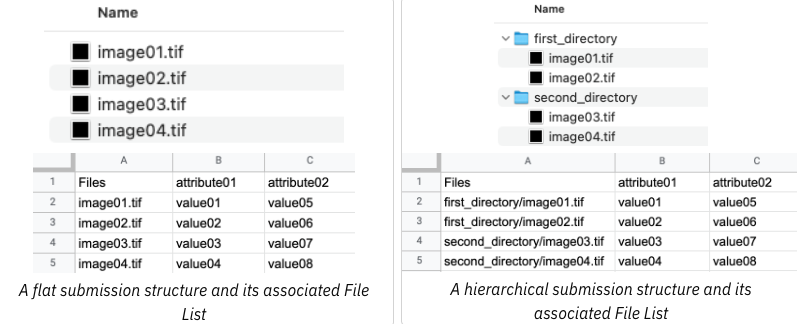
You need to have at least one file list per submission. If you have different study components, like different experiments belonging to the same submission, you must have one file list per study component. In this case the file list of that study component would only list the names of files that belong to that study component. There are different ways to arrange your submission into study components if you wish to do so, e.g. by experiments in which you imaged different samples or used different imaging techniques, or by different screens in a high content screening study.
As an example, the file structure below contains both raw data as OME-Zarr images and analysis results as tsv files for two different experiments. The OME-Zarr images should be zipped and submitted as .ome.zarr.zip files as described on this page. The submission is divided into two study components: Experiment 1 and Experiment 2, each containing raw and analysis files belonging to that experiment. The submission has two file lists, one for each study component.

Directory and File Name Rules
Please only use the following allowed characters to name your files:
- Any alphanumeric character
a-z \| A-Z \| 0-9 - Any of the following special characters
!-_.*'()- Exclamation point
! - Hyphen
- - Underscore
_ - Period
. - Asterisk
* - Single quote
' - Open parenthesis
( - Close parenthesis
) - Space
- Exclamation point
Using any other characters will result in validation errors when you try to submit. You can find the list of problematic characters and characters to avoid here.
In rare cases for very large datasets with over half a million files, which may require sub-grouping of files, the file path may refer to a directory. Please contact us before submitting, if this is the case. When referring to a directory the file path must not end with a slash (it should be e.g. “/mysubmission/mysubdirectory”).
Please avoid trailing spaces (space character at the end of a file name), as we do not support them and trim trailing spaces in the file list.
Email us if you have any further questions.
-

The BioImage Archive Online Tutorial
-

The BioImage Archive – Building a Home for Life-Sciences Microscopy Data - the paper describing the BioImage Archive Read more

A paper detailing the need for the BioImage Archive was featured in Nature Methods in November 2018. Read more
-

Examples of bioimages shared and reused. Read more