- Course overview
- Search within this course
- What is UniProt?
- Where does the data come from?
- Why do we need UniProt?
- When to use UniProt
- Quiz: Check your learning I
- How to access and navigate UniProt
- How to search UniProt
- Annotation score
- Quiz: Check your learning II
- Exploring a UniProtKB entry
- How to use UniProt tools
- How to get data from UniProt
- How to submit data to UniProt
- Exercise: finding entries with 3D structures
- Exercise: mapping other database identifiers to UniProt
- Summary
- Get help and support on UniProt
- References
- Next steps
- Your feedback

All materials are free cultural works licensed under a Creative Commons Attribution 4.0 International (CC BY 4.0) license, except where further licensing details are provided.
Finding protein function
UniProt is the primary source for high quality and expertly curated functional data on proteins. This example demonstrates how to use UniProtKB to find the function of CDC7.
On the UniProt website, select ‘UniProtKB’ (this is the default selection) from the drop-down menu next to the search box. Now enter the gene name ‘cdc7’ in the search box and click on the ‘Search’ icon (Figure 67).

You get a results page with an entry named CDC7_HUMAN being the top hit (Figure 68).

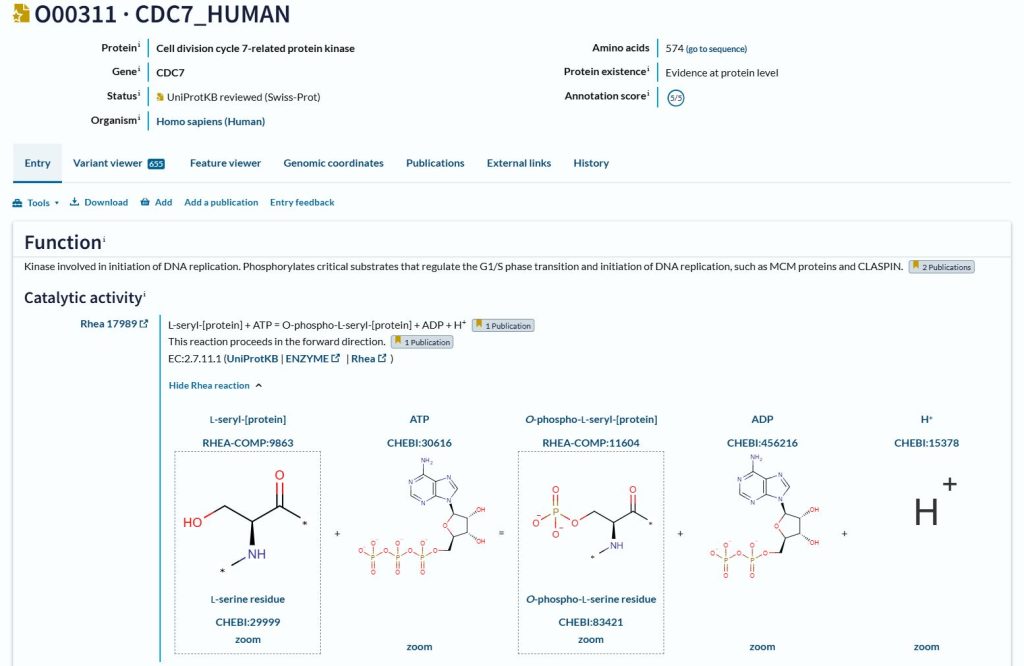
If you click on the top hit, you are taken to the protein entry page. The summary section at the top of the page provides some overview information including the protein name, gene name, organism and status. Below this is the ‘Function’ section (Figure 69). As the summary section shows, this is a ‘UniProtKB reviewed (Swiss-Prot)’ entry. The ‘Function’ section provides expertly curated information describing the role of the protein and showing the reactions it catalyses. Evidence for the information is also provided, showing which publications are the sources of the data.