- Course overview
- Search within this course
- What is BioImage Archive?
- Searching data in the BioImage Archive
- Visualising image data in the BioImage Archive
- Getting data from the BioImage Archive
- Your feedback
- Get help and support on BioImage Archive
- References

All materials are free cultural works licensed under a Creative Commons Attribution 4.0 International (CC BY 4.0) license, except where further licensing details are provided.
File organisation
You need to have at least one file list per submission. If you have different study components, like different experiments belonging to the same submission, you must have one file list per study component. In this case the file list of that study component would only list the names of files that belong to that study component. Similarly if you have annotations, you can have more than one annotation section, for example belonging to different types of annotations, similar to study components.
There are different ways to arrange your submission into study components if you wish to do so, e.g. by experiments in which you imaged different samples or used different imaging techniques, or by different screens in a high content screening study.
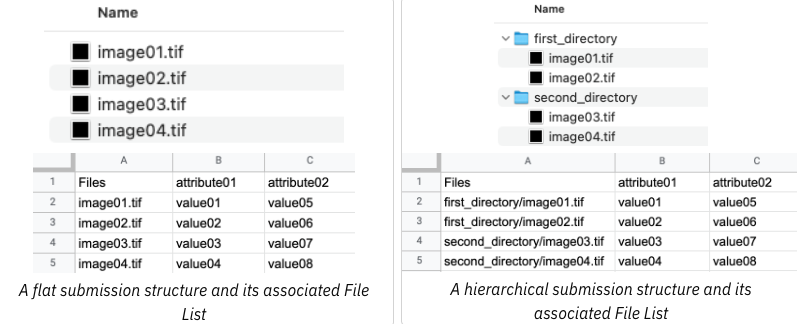
If you have organised files in your BioStudies home directory in a hierarchy, do not forget to reflect that in the file list. E.g., if you have in your home directory folders “Sample1” and “Sample2”, refer to files inside those folders as “Sample1/imageFile1.tif” etc (Figure 20). However, if there is embedded metadata in the directory structure, please put that information as metadata in the file list.
The file path separator must be forward slash “/”, anything else like “\” or “\ \” will not work. Please avoid relative paths (./ or ../) and trailing slashes (e.g. //).
Fill in attribute values for each of the image files. Do not leave blank lines.