Introduction
This is a demonstration of a stand-alone replica version of the PDBe Search
Database (MSDSD) in mySQL, together with tools and examples about how to use it.
All the software together with the demo database is self-contained and wrapped up
in a single CR-ROM disc that may be installed and used directly in any Windows or
Linux machine. There are no other special pre-requisites apart from 1 GB of
free disk space.
Download MSD-demo CD
This is a cut-down version of the MSDSD in the amount of data that it
includes and this was imposed by the need to have a standalone mySQL database of
a size that is practical for demonstration purposes (when compressed fits in
a CD-ROM). So while the full width of MSDSD is included (100 tables - 1948 columns)
instead of the 30695 PDB entries that MSDSD currently includes, this has data for
- 1254 entries that are included in the SCOP list of representative
entries for most tables except
- 153 entries in the SCOP list with resolution between 1.1 and 1.4
on the residue level (tables RESIDUE, RESIDUE_DATA etc)
- 49 entries in the SCOP list with resolution between 1.3 and 1.4
on the atom level (tables ATOM, ATOM_DATA etc)
You may get a copy (subject to licensing restrictions) of this MSD-demo
CD-ROM disc and follow these steps in order to repeat the PDBe tutorial later.
The purpose of this CD-ROM is for demonstration and educational purposes only.
Please read carefully the licence.txt file before start using the CD-ROM disc.
This CR-ROM includes
a) Java 1.4 preinstalled for windows and linux
b) mySQL 4.1.12 preinstalled for windows and linux
c) The QueryForm Database Tool
d) Rhino 1.5 from Mozzila
e) mySQL ODBC drivers 02.50.38, setup for windows
f) Jakarta Tomcat 4.1 servlet container
g) The MSDSD (PDBe search database) a cut-down demo version preloaded
in MySQL
h) The MSD-mine servlet web application setup to run locally and access
the local mySQL database.
i) A demonstration setup of the MSDSD incremental update mechanism
j) Example files and scripts
k) The standalone static MSDSD data warehouse documentation
Contents
-
Getting started
- Configure MSD-demo
- Start the MySQL database
- Using the MySQL command prompt
- The QueryForm Tool
- Scripting the database
- Loading data in Excel
Getting started
Install the MSD-demo CD-ROM disc
This may have been done already for you in advance, in order to save
time so ask your tutor before you start.
Follow the steps in the install.txt file of the CD-ROM disc and run
the install.bat script. This will unzip the msddemo.zip file on drive C:\
and create the C:\msddemo directory.
Test that everything is OK. Open "My Computer" or the Windows "Explorer"
and check that C:\msddemo exists and is populated with files and directories
Configure MSD-demo
Run the script C:\msddemo\bin\config.bat. This will create a virtual drive
O: and will copy the mySQL ini files in the appropriate locations. You
will have to rerun this script after each reboot
of the host in order to re-create the virtual drive O:
Test that everything is OK. Open "My Computer" or the Windows "Explorer"
and check that the virtual drive O: exists. Also check that the file C:\my.cnf
(mySQL configuration file) exists
Start the mySQL database
Run the script O:\bin\startdb.bat. Leave the mySQL server window open
040114 10:37:02  InnoDB: Started
mysqld: ready for connections
Use the mySQL command prompt
This is the default mySQL prompt for giving queries and retrieving
results. Run O:\bin\mysql.bat
Welcome to the MySQL monitor.  Commands end with ; or \g.
Your MySQL connection id is 10 to server version: 4.0.1-alpha-max-debug
Type 'help;' or '\h' for help. Type '\c' to clear the buffer.
mysql>
Now you may try some SQL statements like
Get the number of assemblies in the MSDSD
mysql> SELECT COUNT(1) FROM ASSEMBLY;
+----------+
| COUNT(1) |
+----------+
|     1859 |
+----------+
1 row in set (0.54 sec)
Get information for the biggest chains and the accessible surface area
of their assemblies
mysql> SELECT ACCESSION_CODE AS PDB,ASSEMBLY_SERIAL AS ASSEMBLY,CHAIN_CODE,
              ASSEMBLY_TYPE,NUM_RESIDUES AS RESIDUES,ASA
       FROM CHAIN WHERE NUM_RESIDUES>1200 AND ASA IS NOT NULL
       ORDER BY NUM_RESIDUES DESC;
+------+----------+------------+---------------+----------+-----------+
| PDB  | ASSEMBLY | CHAIN_CODE | ASSEMBLY_TYPE | RESIDUES | ASA       |
+------+----------+------------+---------------+----------+-----------+
| 1jj2 |        1 | 0          | 30MERIC       |     2922 | 364565.38 |
| 1k83 |        1 | A          | UNDECAMERIC   |     1733 | 70037.5   |
| 1iw7 |        1 | D          | HEXAMERIC     |     1524 | 74184.3   |
| 1iw7 |        2 | N          | HEXAMERIC     |     1524 | 73932.4   |
| 1fjg |        1 | A          | 22MERIC       |     1522 |  209180   |
+------+----------+------------+---------------+----------+-----------+
12 rows in set (1.07 sec)
Find the entries with the most secondary structure “turn” elements that
start with an Alanine
mysql> SELECT ACCESSION_CODE,COUNT(1) AS NUM_TURNS
       FROM TURN
       WHERE NON_ASSEMBLY_VALID='Y' AND RES_1_CHEM_COMP_CODE='ALA_LL'
       GROUP BY ACCESSION_CODE
       HAVING NUM_TURNS>8;
+----------------+-----------+
| ACCESSION_CODE | NUM_TURNS |
+----------------+-----------+
| 1ezg           |        10 |
| 1hbn           |        13 |
| 1oc7           |        10 |
+----------------+-----------+
3 rows in set (0.17 sec)
You may write SQL queries that use any other of the 100 tables and 1948
tables, and even do table joins or other “group by” expressions etc.
Use the QueryForm tool
This is a freeware GUI application that allows the execution and
result view of SQL statements to any database through JDBC. Run O:\bin\qform.bat
Click on "Connect:Data Source ..." icon and press the "New" button.
Select
- "org.gjt.mm.mysql.Driver" as the "Driver Class",
- "msddemo" as
the "Display Name" and
- "jdbc:mysql://localhost/msdsd" as the Database
URL.
Press "Save" and then "Connect"

Click on the Menu "Query Form:New Query Form",
- choose the "helix" table
and press "OK"
- Select the "Grid View" click on the "SQL" icon,
- give
"NUM_RESIDUES=25" and
- press the "Submit" button

You may also use any other table in the list an perform more queries
Write a small script program that uses the database
This will demonstrate how to write a small program in a scripting or
programming language that uses the MSDSD database.
This uses Rhino 1.5 from Mozzila, a scripting environment that allows
scripting Java through LiveConnect. It is a standalone server Javascript
environment for JavaScript 1.5. It enables portable and easy database scripting
through JDBC. Rhino was chosen for portability and simplicity on the demonstration.
A very similar example could be made by using perl and DBI, plain Java
or C and C++.
The example script O:\examples\chain_seq.js loads the secondary information
on a residue level for a particular chain and builds a sequence like string
for the secondary structure of the chain using the DSSP and Promotif symbols.
Open a command prompt. In the Windows “Start:Run…” menu give “cmd”
C:\>O:
O:\>set CLASSPATH=O:\bin\mysql\jdbc\mm.mysql-2.0.4-bin.jar
O:\>cd O:\examples
Now run the script example
O:\>..\bin\js chain_seq.js
Sequence           :  INPLHAYFKLPNTVSLVAGSSEGETPLNAFDGALLNAGIGNVNLIRIS
DSSP Sequence      :  ????SGGGS???EEEEEEEEEE?SSHHHHHHHHHHHHT?TTSEEEEB?
Promotif Sequence  :  ????gGGGg??eEEEEEEEEEEeShHHHHHHHHHHHHhtTTtEEEEe?
Ca chiral Sequence :  ?--+++++---+---+++-+---+-+++++++++++-++++-----??
Edit the file chain_seq.js and change the "where" clause of the query by replacing the
accession code of the entry from 1n13 to another like 1c5e and run again
You may also work using the equivalent plain java program chain_seq.java.
In order to compile the program you have to give the command
O:\examples>..\bin\j2sdk1.4.1_04\bin\javac -classpath O:\bin\mysql\jdbc\mm.mysql-2.0.4-bin.jar chain_seq.java
and in order to run it give
O:\examples>..\bin\j2sdk1.4.1_04\bin\java -classpath O:\bin\mysql\jdbc\mm.mysql-2.0.4-bin.jar;. chain_seq
Access the MSDSD on your local mySQL from Microsoft Excel
Install the Windows ODBC driver:
Run the "setup.exe" at O:\pkgs\mysqlodbc
and then
run the "odbcad32.exe" at O:\pkgs\mysqlodbc
Press "Add" select the "MySQL" ODBC driver and press "Finish".
Give "msddemo" as the "Windows DSN name", "localhost" for "MySQL Host"
and "msdsd" as the "MySQL database name".
Open the example Excel file at O:\examples\helix_more_25res.xls right
click on the data area and select "Edit Query"
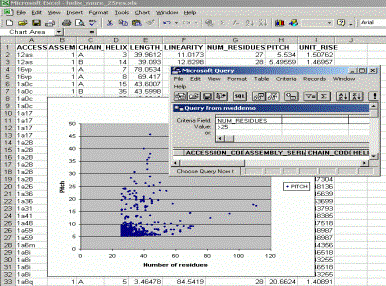
The chart that is displayed is a X-Y scatter chart of the “Pitch” to
the “Number of Residues” or helices with more than 25 residues.
You may get more data from “Data:Get External Data:New Database Query”
menu and make more charts on the results etc.
| 