| |
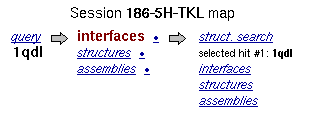
Session map provides the navigation
links to different parts of the service. Link for currently viewed
page is always shown in bold maroon (thus currently viewed page
for the example below is list of interfaces found in the query
structure). Click on parts of the image below to get their descriptrion:
|
-
Session ID
-
is a unique identifier which is assigned to your session. A session is created
automatically when you enter the
Submission Form from the PISA home page. Returning to Submission
Form from the result pages leaves you in the same session.
You may have as many sessions opened as necessary. Please quote
Session ID when you report a problem or ask a question.
-
Link query
-
leads to the
Submission Form. If a PDB entry was submitted as
a query, then line below the links give the corresponding PDB code.
In case of submission of a user file, the entry is denoted as
file.
-
Link interfaces
in the middle group of links
-
leads to the list of interfaces found in the query structure. The
bullet next to the link leads to the page with details of currently
selected (last accessed) interface.
-
Link structures
in the middle group of links
-
leads to the list of monomeric chains found in the query structure.
The bullet next to the link leads to the page with details of currently
selected (last accessed) chain.
-
Link assemblies
in the middle group of links
-
leads to the list of probable protein assemblies (quaternary structures,
or biological units) calculated for the query structure. The bullet
next to the link leads to the page with details of currently selected
(last accessed) assembly. The bullet is absent if no stable assemblies
were found.
-
The arrow
-
between the middle and the rightmost groups of links leads to the
Submission Form for structural searches.
-
Link struct. search
-
leads to the list of structure search hits found in the last structure
search performed in the session. If no structure searches were done,
all links in the rightmost column are shown in black and are inactive.
If list of structural hits is not empty, the line below the link
gives the PDB code of currently selected (last accessed) structural
hit.
-
Link interfaces
in the rightmost group of links
-
leads to the list of interfaces found in the currently selected
structural hit. The bullet next to the link leads to the page with
details of currently selected (last accessed) interface in that hit.
If no structure searches were done, the link is shown in black and
is inactive.
-
Link structures
in the rightmost group of links
-
leads to the list of monomeric chains found in the currently selected
structural hit. The bullet next to the link leads to the page with
details of currently selected (last accessed) chain in that hit.
If no structure searches were done, the link is shown in black and
is inactive.
-
Link assemblies
in the rightmost group of links
-
leads to the list of probable protein assemblies (quaternary structures,
or biological units) calculated for the currently selected structural
hit. The bullet next to the link leads to the page with details of
currently selected (last accessed) assembly for that hit. The bullet
is absent if no stable assemblies were found. If no structure searches
were done, the link is shown in black and is inactive.
|
|